If you want to improve your website’s SEO, create URLs that are short, descriptive, and include relevant keywords. Also, use hyphens to separate words, avoid special characters, and make URLs easy to read for both users and search engines.
Creating SEO-friendly URLs is an easy but often overlooked part of on-page SEO. Generally, a clear, well-structured URL will help search engines understand your page. Also, it will make your website easier for visitors to navigate and can increase your click-through rates from search results. If you are unsure how to optimize your URLs for higher rankings, read this blog. Here, based on Google’s SEO guidelines and real-world website optimization experience, we have explained how to create SEO-friendly URLs, what mistakes to avoid, and why they matter for your website’s performance.
A URL (Uniform Resource Locator) is the web address that points to a specific page on the Internet. Each part of a URL has a purpose to help both users and search engines understand the page.
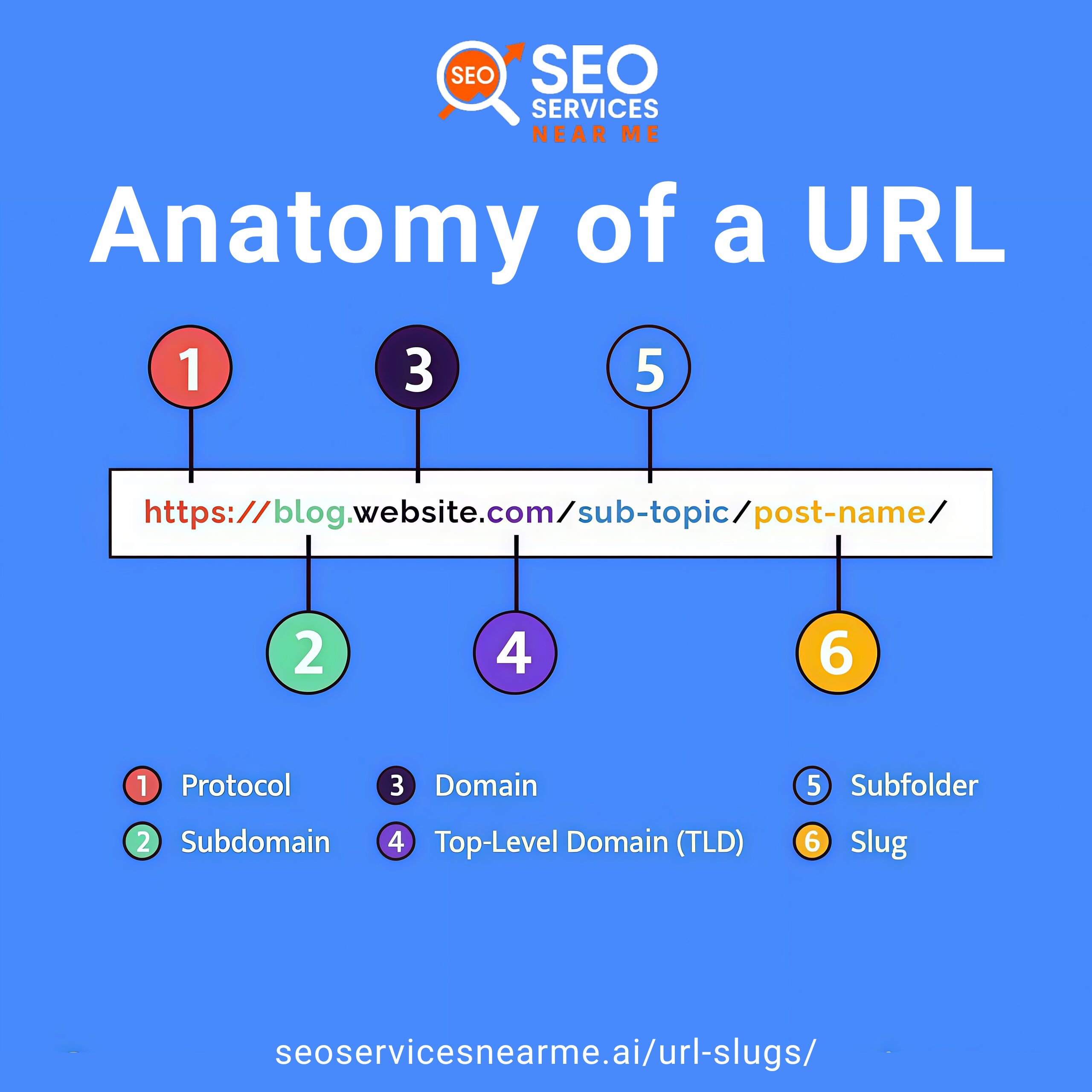
An SEO-friendly URL is a web address that is simple and easy to read for both people and search engines. It clearly shows what the page is about using relevant keywords, without extra symbols or confusing numbers. Search engines look at URLs to rank pages, and users use them to decide if a page is trustworthy and relevant.
| Better SEO URL | Poor SEO URL
|
| https://abc.com/seo-friendly-urls
|
https://abc.com/index.php?id=123&ref=abc
|
| xyz.com/Blog/SEO Tips & Info
|
xyz.com/seo-tips
|
Google Search Central says that URLs help search engines understand your website’s structure and what each page is about. This highlights the importance of SEO-friendly URLs. Most importantly, optimized URLs will help your website perform better in many ways.
When you optimize your website URL, you can achieve the following benefits:
If you are interested in optimizing the URL of your website, then follow the steps below:
First, decide whether the URL will be static or dynamic.
Next, find the keywords your audience searches for most often. You can use SEO tools like Google Keyword Planner, SEMrush, or Moz to discover popular and long-tail keywords and use them when creating your URLs.
Before you start optimizing your URL, give a descriptive title for your page, which should basically incorporate your target keywords. This ensures your URL is optimized based on your page title. Use a title of a varying size of approximately 50-60 characters, action words, and test a few titles.
Ensure that the URL slug is readable. Omit unnecessary characters, include the target keyword, use lower case, keep it short, and add hyphens to separate words instead of spaces or underscores.
Breadcrumbs provide users with their current position on the website and track their path from the homepage to their current location on the website. They provide easier navigation on a website and help with page ranking in search engines. In case your website has subcategories, you need to display these in the URL to determine the page’s hierarchy. For example, abc.com/blog/seo-tips
After creating or updating URLs, periodically check for broken links (404 errors) and resolve them by updating the link or adding redirects to the proper pages. This will enhance the users’ experience and make the indexing of the site by search engines easier.
A well-optimized URL has certain important features that make it easier for search engines and users to understand. Follow these best practices to make URLs clear, readable, and optimized for search.
| Best Practices | Description | Example |
| Include Relevant Keywords | Add the main keyword to show the page’s topic. Avoid stuffing and focus on clarity. | Good: /how-to-create-seo-friendly-urls Bad: /seo-url-best-seo-url-seo-tips |
| Keep URLs Short & Simple | Short, clear URLs are easier to share and remember. Remove unnecessary words like and, the, of unless they improve meaning. | /seo-tips |
| Use Hyphens Instead of Underscores | Hyphens separate words for search engines, while underscores are not recognized the same way. | Correct: seo-friendly-urls Incorrect: seo_friendly_urls |
| Avoid Special Characters & Numbers | Characters like – ?, %, &, or extra numbers can confuse users and search engines. | /page?id=457&cat=9 (avoid) |
| Use Lowercase Letters | Uppercase letters may cause duplicate content issues because URLs are case-sensitive. | /seo-tips |
| Reflect Site Hierarchy | Show the page’s location within the website structure so users and search engines can easily understand it. | sample.com/blog/seo/url-optimization |
Steer clear of these very common mistakes and follow smart approaches that make URLs SEO-friendly:
SEO-friendly URLs are very crucial in on-page search engine optimization. Even if these URLs are very small, their impact can be very significant in relation to search engine rankings. Short and descriptive URLs with proper use of target keywords can improve the SEO of any website. Take our advanced AI SEO services if you are not aware of how to use search engine-friendly URLs on your website. The SEO experts from our team will help you in fulfilling all of your demands.
Only change URLs when necessary. If you do, set up 301 redirects, update your internal links, and resubmit your sitemap in Google Search Console. Avoid unnecessary changes, as they can temporarily hurt your rankings.
The URL length can be around 50-60 characters, and it should clearly show the page’s content.
Include dates only for time-sensitive content like news. Avoid them for evergreen content, as they can make pages appear outdated.